Tutorial #1:
Creating Traffic Jam
Part III: Starting the Code
First, let's make the grid look a little more appealing. Everything it Windows is based around events. An event is raised when something happens and your program needs to take care of something. For example, an event is raised when a control needs to redraw itself for some reason, perhaps the form was minimized and is no longer. This event is called the Paint event, and we will use it to draw the grid.
Click the "View Code" button at the top of the Solution Explorer on the right hand side of the screen. Then in the left drop down box, select "pbPuzzle", and then in the right one, select "Paint".
When you do this, VisualBasic will create a subroutine for you that has all of the necessary parameters. Don't worry about this too much, just know that it works!
Now, we need to enter some code, so enter the following:
    Private Sub pbPuzzle_Paint(ByVal sender As Object, ByVal e As System.Windows.Forms.PaintEventArgs) _
				Handles pbPuzzle.Paint

        Dim G As Graphics
        Dim i As Integer

        G = e.Graphics
        For i = 0 To 5
            'Draw the horizontal gridline
            G.DrawLine(Pens.Blue, i * 64 + 2, 0, i * 64 + 2, 388)
            G.DrawLine(Pens.Blue, (i + 1) * 64 + 1, 0, (i + 1) * 64 + 1, 388)
            'Draw the vertical gridline
            G.DrawLine(Pens.Blue, 0, i * 64 + 2, 388, i * 64 + 2)
            G.DrawLine(Pens.Blue, 0, (i + 1) * 64 + 1, 388, (i + 1) * 64 + 1)
        Next
        'Now, draw the border
        'Left Side
        G.DrawLine(Pens.Blue, 0, 0, 0, 388)
        G.DrawLine(Pens.Blue, 1, 0, 1, 388)
        'Top
        G.DrawLine(Pens.Blue, 0, 0, 388, 0)
        G.DrawLine(Pens.Blue, 0, 1, 388, 1)
        'Bottom
        G.DrawLine(Pens.Blue, 0, 386, 388, 386)
        G.DrawLine(Pens.Blue, 0, 387, 388, 387)
        'Right, but remember the gap for our car to exit!
        G.DrawLine(Pens.Blue, 386, 0, 386, 130)
        G.DrawLine(Pens.Blue, 387, 0, 387, 130)
        G.DrawLine(Pens.Blue, 386, 194, 386, 388)
        G.DrawLine(Pens.Blue, 387, 194, 387, 388)
    End Sub
|
After entering the above code and running your program, it should look something like this:
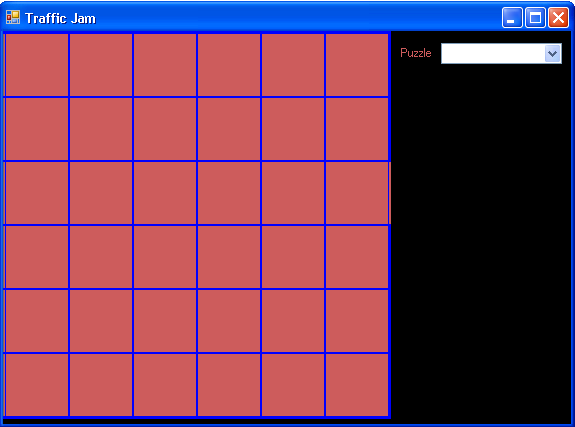
I tried commenting the code above so that you can see what is going on. For some reason, the background is not changing. I will now do that the easy way by just changing the background color in design mode. (I believe that DrawRectangle does not draw filled rectangles.) Also, I adjusted the position of the PictureBox to allow a bit of the black background of the form to show all around it. It makes for a better effect.